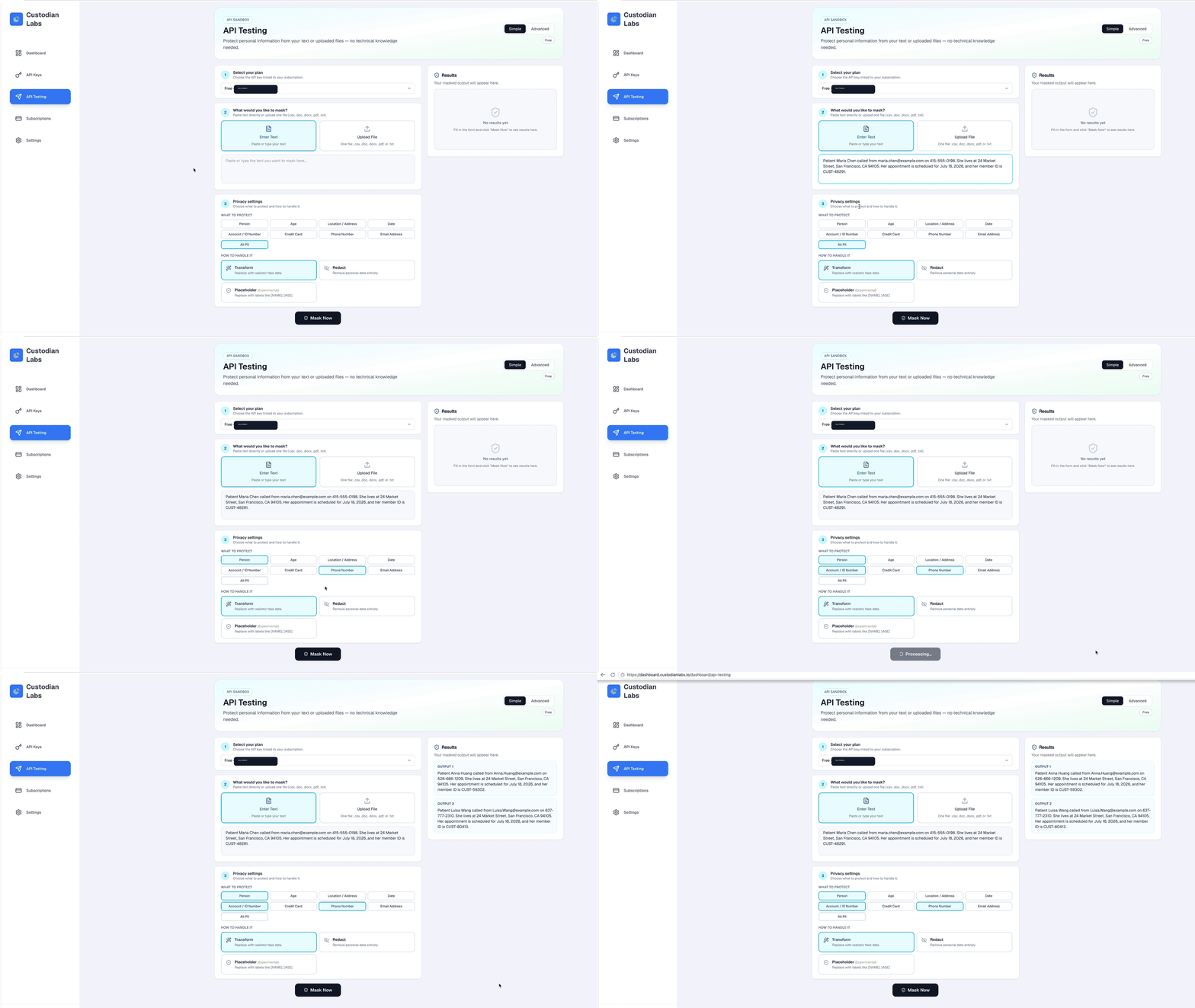
API Testing
API Testing lets you send de-identification requests from the dashboard before you integrate Custodian Labs into an application.
Use this page to confirm that:
- Your API key works.
- Your endpoint is reachable.
- Your selected privacy settings return the expected result.
- Text and file de-identification behave as expected.
Open it here:
Prerequisites
Before using API Testing, make sure you have:
- A logged-in Custodian Labs account.
- An active plan.
- At least one generated API key.
If no API key appears in the selector, go to API Key Management or Managing Subscriptions.
Simple Mode
Simple mode is for quick browser-based testing without writing code.
Use Simple mode when you want to:
- Paste text and see a protected result.
- Upload one supported file.
- Choose common PII categories from the UI.
- Switch between transformation behavior without editing JSON.
Simple mode supports:
- Text input.
- File upload.
- API key selection.
- PII category selection.
- Masking type selection.
- Results preview.
- Download output for supported file responses.
Advanced Mode
Advanced mode is for users who want to test a specific request shape.
Use Advanced mode when you want to:
- Enter a specific API endpoint.
- Edit the JSON request body.
- Test a custom payload.
- Inspect the raw response.
This mode is useful when you are preparing an integration and want the dashboard request to match your application request more closely.
Test Text
To test text de-identification:
- Open API Testing.
- Select an API key.
- Choose text input.
- Paste sample text that contains sensitive data.
- Choose what to protect.
- Choose how to handle the detected data.
- Send the request.
- Review the result.
Example test text:
Patient Maria Chen called from maria.chen@example.com on 415-555-0198. She lives at 24 Market Street, San Francisco.
Test a File
To test file de-identification:
- Open API Testing.
- Select an API key.
- Choose file upload.
- Upload one supported file.
- Choose the PII categories and transformation behavior.
- Send the request.
- Download or inspect the returned result.
Supported file types include:
.csv.doc.docx.pdf.txt
For endpoint-level details, see File Endpoints.
Privacy Settings
API Testing exposes the same high-level privacy choices used by the API.
Common options include:
- Person
- Age
- Location / Address
- Date
- Account / ID Number
- Credit Card
- Phone Number
- Email Address
- All PII
For a fuller list of detectable data types, see Supported Entities.
Transformation Behavior
The dashboard may let you choose how detected data is handled.
For example:
transformuses Custodian Labs' proprietary de-identification algorithm.redactremoves or masks sensitive values more directly.
For conceptual differences, see Transform and Redact / Masking / Placeholder.
Common Issues
If the request fails:
- Confirm an API key is selected.
- Confirm the API key is active.
- Confirm your plan has remaining credits and requests.
- Confirm the text endpoint is configured if using text testing.
- Confirm the uploaded file type is supported.
- Confirm the request body is valid JSON in Advanced mode.
For API-level errors, see Error Responses.
Examples